Sites and areas: how TidyTrack is organized
Everything in TidyTrack hangs off two ideas: the buildings you clean and the rooms inside them. Get these right once and checklists, schedules, alerts and reports line up on their own.
The short version
- A site is a building or address you clean.
- An area is a room or spot inside a site, such as a washroom, kitchen or lobby.
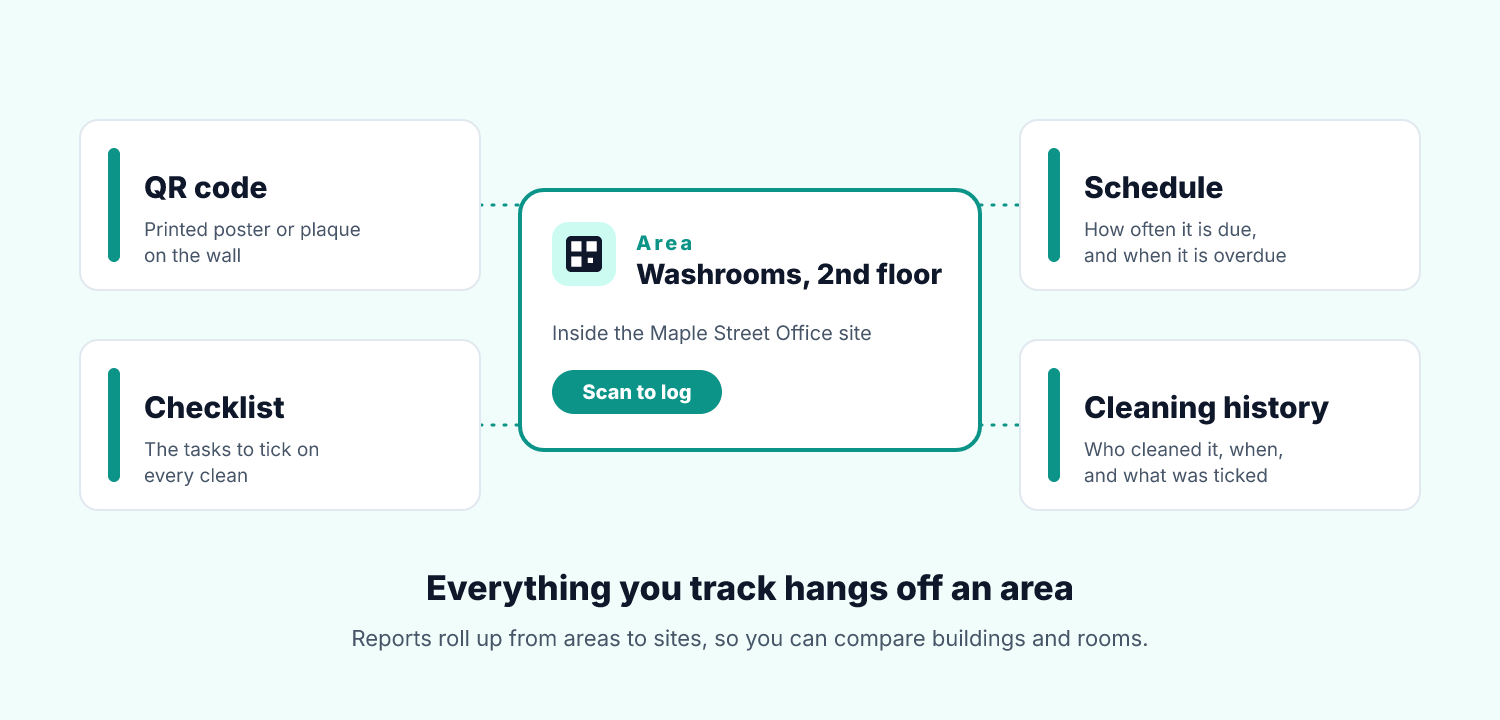
- Each area gets a QR code. Cleaners scan it, tick the checklist and the clean is logged.
What is a site?
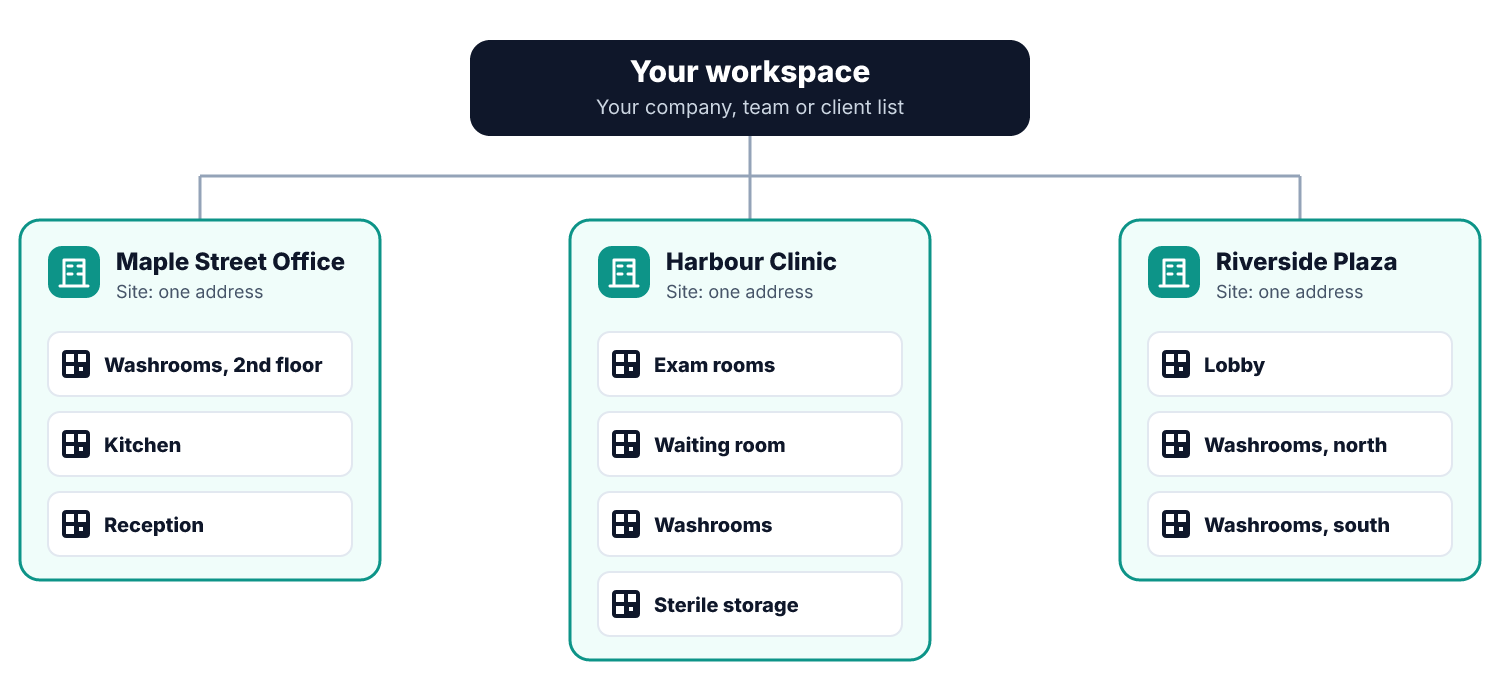
A site is one physical location: an office, a clinic, a store, a condo tower or a client's premises. It is the level you assign supervisors to, set shift rules for and run inspections on. Reports can be viewed per site, so you can compare buildings side by side.
What is an area?
An area is a room or spot inside a site that gets cleaned on its own terms. The area is where the work happens, so it is where the checklist, the schedule and the QR code live.
How they fit together
Your workspace holds your sites, and each site holds its areas. An area belongs to one site. When you want a view across buildings, look at sites. When you want to know whether one room was cleaned, look at its area.
Choosing what is a site and what is an area
Use the address as the test. A different address is a different site. A different room is a different area.
| If you are | Sites | Areas |
|---|---|---|
| One office or store | One site for the address | Washrooms, kitchen, reception, meeting rooms |
| A clinic or hotel with several floors | One site per building | Exam rooms, lobby, each washroom block, guest room floors |
| A property manager with several buildings | One site per building or address | Lobby, common washrooms, gym, garbage room |
| A cleaning business with clients | One site per client location | The rooms in your contract scope, so each can be logged and invoiced |
Naming tips
- Name areas the way your cleaners say them: "Washrooms, 2nd floor", not "B2-W3".
- Put the floor or wing in the name when a site has repeats, so two lobbies never look alike.
- Name sites by building or street, and include the client name if you clean for several.
- Keep one checklist per kind of room. Washrooms, kitchens and offices each need different tasks.
How many sites and areas you can have
Limits depend on your plan. QR scan-to-log, checklists, schedules and overdue alerts are on every plan, including Free.
| Plan | Sites | Areas |
|---|---|---|
| Free | 1 | 3 |
| Pro | 5 | 100 |
| Business | 20 | 400 |
See pricing for extra sites and the full plan comparison.
Set up your own
- Add a site. Give the building a name and an address.
- Add its areas. Pick a kind of room and TidyTrack suggests a checklist and how often to clean it.
- Print the QR codes. Put one in each area. Posters and plaques are both available.
- Scan one. Log a test clean to see what your cleaners see.
Common questions
What if I only clean one building?
Then you have one site. Add each room or spot you want logged as an area. Most single-building teams never need a second site.
Should a floor be a site or an area?
Neither by default. Keep the building as the site and add the rooms on each floor as areas. Floors and buildings are optional groupings inside a site, useful once a site has many areas.
How detailed should my areas be?
Make an area the unit that gets one checklist and one QR code. If two washrooms are cleaned at different times or by different people, make them two areas. If they are always done together, one area is enough.
Can I try it with a single room first?
Yes. The quick start sets up one area with a checklist and shows a QR code on screen so you can scan it with your phone before you set up the rest.
Do cleaners need an account?
No. A cleaner scans the QR code with their phone camera, picks their name, ticks the checklist and submits. There is no app to install.
Ready to set up your first site?
Start with one room and add the rest later. Questions go to [email protected].
Prefer the long version? Read how to structure your sites and areas on the blog, or browse all guides.